

Inventory stock report
The Inventory stock report shows, for each material and period, the quantity and value at the Beginning, what was Imported, Loss, Exported, and the Ending stock.
Open the report
Section titled “Open the report”Open Inventory stock
In the sidebar, under Reports, click Inventory stock.
Filter the report
- Filter by range: pick the period. The default is the last 7 days.
- Filter by warehouse: show one warehouse.
- Filter by material: show one material.
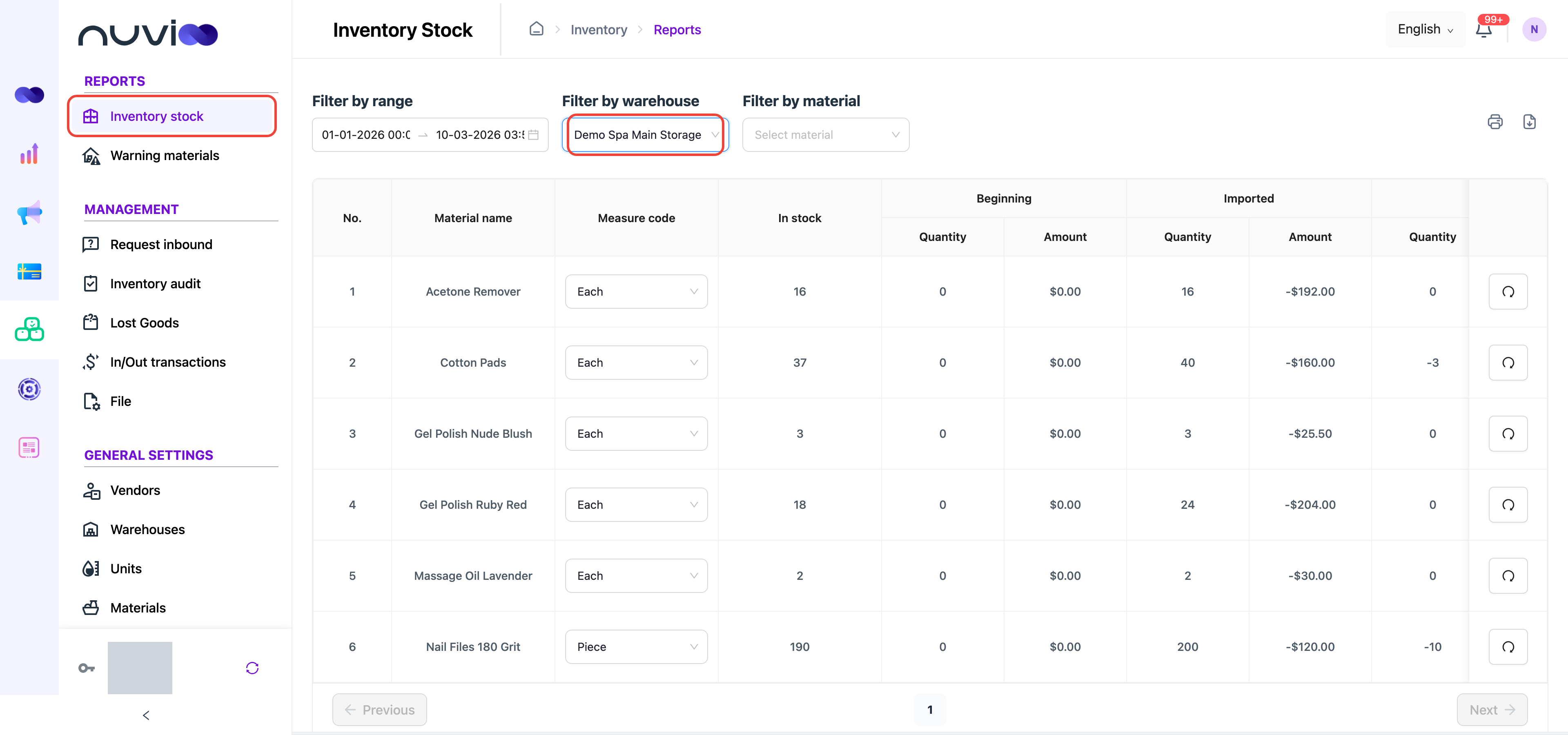
Inventory stock for one warehouse Read the columns
Scroll the table sideways to see every column group. Each group has a Quantity and an Amount. Use the Measure code list on a row to see that material in another unit.
Print or download
Section titled “Print or download”Use the print and download icons above the table to save the report as PDF or Excel.
Recalculate a material
Section titled “Recalculate a material”If a material’s figures look wrong, click the refresh button at the end of its row, then Yes. The stock report for that material is recalculated.